Write It, Run It, Delete It: A WP-CLI Migration Pattern
Rol Torralba
April 16, 2026
4 min read
80+ law firm case results were living as static HTML in a template file. I wrote a WP-CLI migration script with --dry-run and --rollback flags, ran it in production, then deleted it in the very next commit. That's the right pattern for one-off data migrations.
The law firm's case results — eighty-something of them — were hardcoded into a template file as a static PHP array. Titles, settlement amounts, practice area categories, outcome types, content blurbs. All of it manually maintained by whoever had filesystem access and was comfortable editing PHP.
Adding a new settlement meant editing a source file, committing it, and deploying. That's a developer ticket every time a partner won a case. And it meant the results weren't queryable, weren't filterable, and couldn't be managed through the WordPress admin. For a firm that wins cases regularly and wants those wins visible on their site, the friction was real.
The fix was a case_result WP-CLI migration script. I wrote it, tested it with a dry-run, ran it in production, then deleted it in the next commit.
wp eval-file path/to/script.php runs a PHP file with full access to the WordPress environment — globals loaded, all functions available, full database access. No bootstrapping, no plugin activation, no browser. You get wp_insert_post(), ACF's update_field(), wp_set_post_terms(), the whole stack.
It's the right tool for one-off migrations. You're not writing a plugin that lives in the codebase forever. You're writing a script that runs once, successfully, and disappears.
The source data was already in a PHP array inside the old template — titles, a price_text field (the dollar amount), category slugs, result-type tags, and content. I copied that array into the migration script as-is and built the import logic around it.
The core loop looked like this:
foreach ( $case_results as $result ) {

    if ( isset( $args['dry-run'] ) ) {
        WP_CLI::log( '[DRY RUN] Would create: ' . $result['title'] );
        continue;
    }

    $post_id = wp_insert_post([
        'post_title'   => $result['title'],
        'post_type'    => 'case_result',
        'post_status'  => 'publish',
        'post_content' => $result['content'] ?? '',
    ]);

    if ( is_wp_error( $post_id ) ) {
        WP_CLI::warning( 'Failed: ' . $result['title'] );
        continue;
    }

    update_field( 'price_text', $result['price_text'], $post_id );

    foreach ( $result['categories'] as $cat_slug ) {
        $term = get_term_by( 'slug', $cat_slug, 'case_category' );
        if ( ! $term ) {
            $inserted = wp_insert_term(
                ucwords( str_replace( '-', ' ', $cat_slug ) ),
                'case_category',
                [ 'slug' => $cat_slug ]
            );
            $term = get_term( $inserted['term_id'], 'case_category' );
        }
        wp_set_post_terms( $post_id, [ $term->term_id ], 'case_category', true );
    }

    // Same pattern for case_result_tag taxonomy

    WP_CLI::success( 'Created: ' . $result['title'] );
}
A few things worth noting:
Taxonomy terms created on the fly. The old template used slug strings for categories — truck-accident, nursing-home, dram-shop. The migration script checked whether each term existed in the case_category taxonomy before trying to assign it, and created missing terms automatically. No pre-seeding required.
ACF field populated directly. update_field( 'price_text', $value, $post_id ) works exactly as it does in a plugin or theme — the ACF API is available through WP-CLI. The price_text value (the settlement or verdict dollar amount) went in cleanly alongside the standard post fields.
Two taxonomies, not one. Case results needed two independent dimensions: practice area (case_category) and outcome type (case_result_tag — Settlement, Jury Verdict, Arbitration Award, Case Study). Same creation pattern applied to both. Keeping them as separate taxonomies meant the archive template could group by practice area while showing color-coded outcome badges on each card.
At the top of the script, $args is parsed from WP_CLI::get_config():
--dry-run: logs every action without writing to the database. Useful for a sanity check before you commit to running the import.--rollback: deletes all case_result posts and clears associated taxonomy terms. An escape hatch for if the import looks wrong after the fact.The workflow was: run with --dry-run in staging, read the log, run for real in staging, spot-check the front-end archive, then run in production. Only then was rollback removed as a concern.
The commit after the production run was one line:
git rm temp/migrate-case-results.phpThat's the right move. Dead migration scripts sitting in a codebase are a quiet source of confusion. Someone reads the file six months later and wonders if it's still relevant. Someone else runs it by accident and creates duplicate posts. At minimum it just adds weight to every git status output.
A migration that succeeded has nothing left to do. The git history preserves the script if you ever need to reconstruct what ran. The working tree doesn't need it.
Pro Tip: For any one-off data migration touching more than a handful of records, the minimum viable safeguard is a
--dry-runflag. If the script creates taxonomy terms or populates ACF fields, add a--rollbackpath too. You want to be able to inspect the output in staging, run in production with confidence, and have an escape hatch — without touching the database directly. Then delete the script the moment it's done its job.
The whole script came in at 459 lines. It lived in the repo for exactly the time needed to write it, test it, and run it in production.
That's the pattern. Proper tooling for a one-off job — not a shortcut, not dead code. Just temporary, intentional, and gone when it's done.
Find out what's slowing your site down, where the security gaps are, and what you can improve. Takes 30 seconds to request.
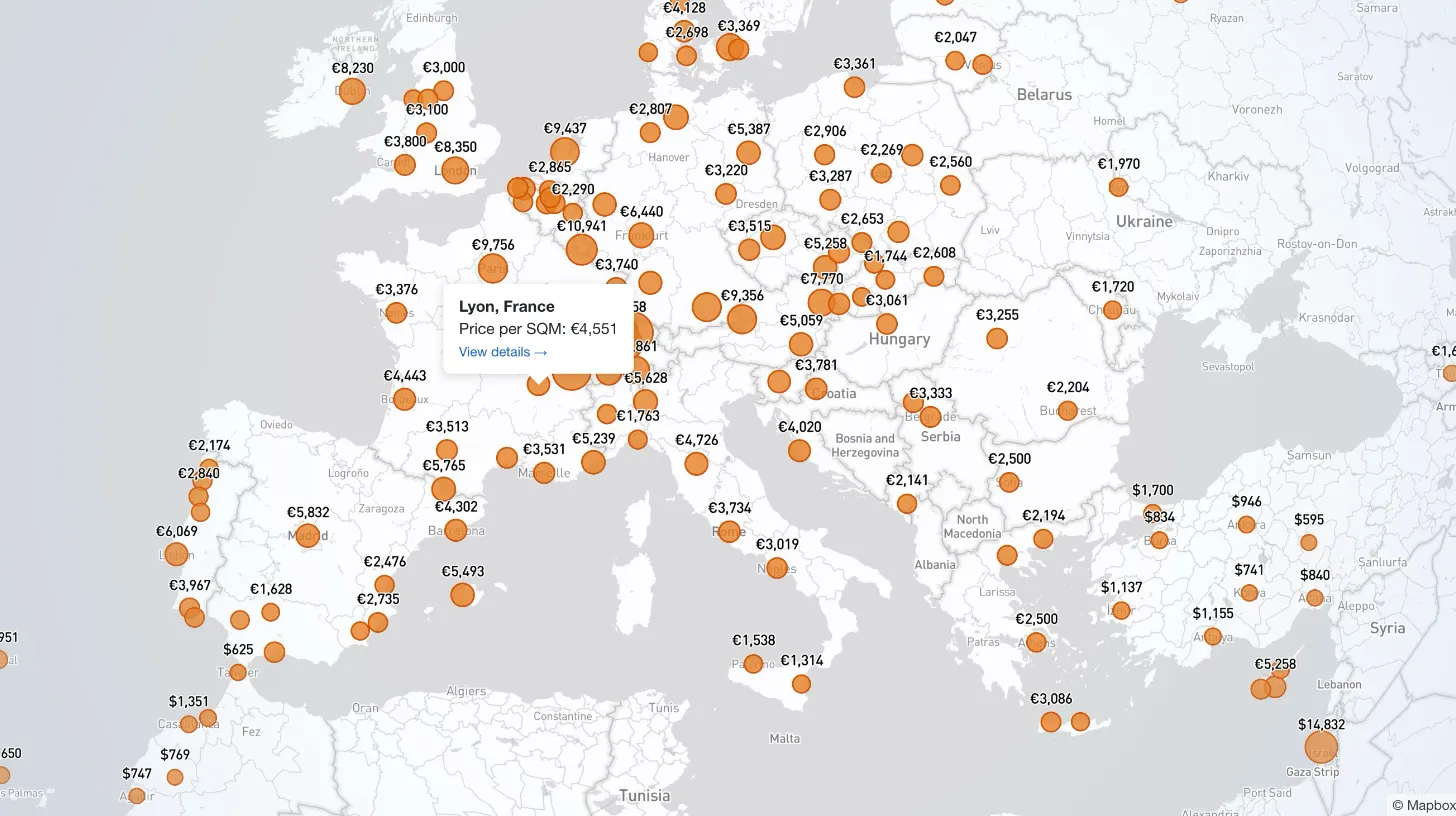
My client publishes real estate data for 80+ countries and wanted a single interactive view that could replace dozens of separate comparison tables. I built a Mapbox GL JS globe with 38+ switchable metrics, bubble and choropleth view modes, city drill-down, currency toggle, and pinned popups that deep-link into the country pages.

Every WordPress dev knows the problem: restore a prod database locally and your browser immediately redirects to the live site. I moved the URL rewrite into MySQL's init hook so it runs automatically on first boot — no manual steps, no redirect loops.

My law firm client's inner pages had no visible author attribution — a real problem for YMYL legal content. I added Schema.org Person microdata to the hero, intentionally bypassed the WordPress author field, and built a per-page ACF toggle for opt-out.

My client's legacy Laravel 5.1 SaaS needed modernization across payments, search, and mapping — all on a codebase that cannot be upgraded without breaking dependencies. I overhauled all three layers in two weeks, without a rewrite and without a database migration.