A Docker Stack That Rewrites WordPress URLs on First Boot
Rol Torralba
April 16, 2026
4 min read
Every WordPress dev knows the problem: restore a prod database locally and your browser immediately redirects to the live site. I moved the URL rewrite into MySQL's init hook so it runs automatically on first boot — no manual steps, no redirect loops.
Every WordPress developer has done this at least once. You pull a database dump from production, import it locally, fire up your dev environment, and open localhost — only to get immediately redirected to the live site. Or you reach the login screen but every media URL is broken. Or admin redirects stop working entirely.
The fix is wp search-replace. Run it after import, swap the old production URL for your local one, done. It works. But it's a manual step, and manual steps are the things nobody remembers on Monday morning when they're just trying to get a local copy of the client site running before a call.
For a long-running law firm project in Oklahoma, I set up a Docker Compose environment where the URL rewrite happens automatically. Pull the repo, drop in the database dump, run docker-compose up — and by the time WordPress is actually ready, the database already points at localhost:8888. No wp search-replace, no redirect loops, no extra steps.
Here's how it works.
The docker-compose.yml has three services: MySQL 8, WordPress on php8.0-apache, and phpMyAdmin. Nothing exotic. The theme directory is live-mounted into the WordPress container, so changes in the editor show up without a rebuild cycle.
The interesting part isn't the services. It's the init hook.
MySQL's official Docker image ships with a convention most people don't know about: any .sh or .sql file placed in /docker-entrypoint-initdb.d/ runs automatically on the first boot of a fresh data volume. This is built into the image itself — it's designed for seeding databases on initial setup.
I wrote a shell script that takes advantage of it.
#!/bin/bash
set -e

mysql -u root -p"$MYSQL_ROOT_PASSWORD" "$MYSQL_DATABASE" < /docker-entrypoint-initdb.d/local.sql

mysql -u root -p"$MYSQL_ROOT_PASSWORD" "$MYSQL_DATABASE" <<-EOSQL
  UPDATE wp_options
    SET option_value = REPLACE(option_value, 'https://oklahomalawyer.com', '$LOCAL_SITE_URL')
    WHERE option_name IN ('siteurl', 'home');
  UPDATE wp_posts
    SET guid = REPLACE(guid, 'https://oklahomalawyer.com', '$LOCAL_SITE_URL');
  UPDATE wp_posts
    SET post_content = REPLACE(post_content, 'https://oklahomalawyer.com', '$LOCAL_SITE_URL');
  UPDATE wp_postmeta
    SET meta_value = REPLACE(meta_value, 'https://oklahomalawyer.com', '$LOCAL_SITE_URL');
EOSQL
The script imports the SQL dump first, then runs four targeted REPLACE() calls. Those four tables cover the main places WordPress stores URLs: wp_options for siteurl and home, wp_posts.guid for internal post identifiers, wp_posts.post_content for embedded media and links in post bodies, and wp_postmeta for serialized ACF data and other field values.
LOCAL_SITE_URL comes from an environment variable set in docker-compose.yml (or a local .env file). The production URL is hardcoded in the script since this is a single-client dev environment — on a more general setup you'd make both sides configurable.
That four-table sweep covers the vast majority of the redirect and broken-URL problems you'd run into on a standard WordPress install.
One thing that bit me early: WordPress would start before MySQL finished its initialization sequence. The /docker-entrypoint-initdb.d/ scripts run as part of MySQL's startup — which takes longer than usual on a cold boot because it has to initialize the data directory, import the SQL dump, and run the rewrites. WordPress coming up first means it tries to connect to a database that isn't queryable yet, and the container restarts in a loop.
The fix is a healthcheck on the MySQL service and a depends_on condition on WordPress:
mysql:
  healthcheck:
    test: ["CMD", "mysqladmin", "ping", "-h", "localhost"]
    interval: 5s
    timeout: 5s
    retries: 10

wordpress:
  depends_on:
    mysql:
      condition: service_healthy
WordPress won't start until MySQL passes the health ping. On a cold boot that's usually 20-30 seconds. Worth it — no more watching the container restart three times before settling.
docker-compose up — wait for the health check — open localhost:8888. Working local site with production data, all URLs pointing at local. phpMyAdmin is on :8889 when you need direct database access.
To reset completely: docker-compose down -v destroys the data volume, and the next docker-compose up runs the whole init sequence again from the SQL dump. Handy when you want a clean database state after a messy debugging session.
The repo includes a .env.example documenting what variables to set (LOCAL_SITE_URL, MYSQL_ROOT_PASSWORD, etc.). A new developer can go from zero to working local environment in about five minutes — drop in the database dump, copy the env file, run compose.
This pattern isn't specific to WordPress. Any time you're running a MySQL-backed app locally with Docker and want initialization logic to run once on a fresh volume, /docker-entrypoint-initdb.d/ is the hook. For WordPress specifically, the four-table URL rewrite is the thing that makes local dev actually usable from a production dump.
Stop running wp search-replace by hand. Put it in the init script.
Find out what's slowing your site down, where the security gaps are, and what you can improve. Takes 30 seconds to request.
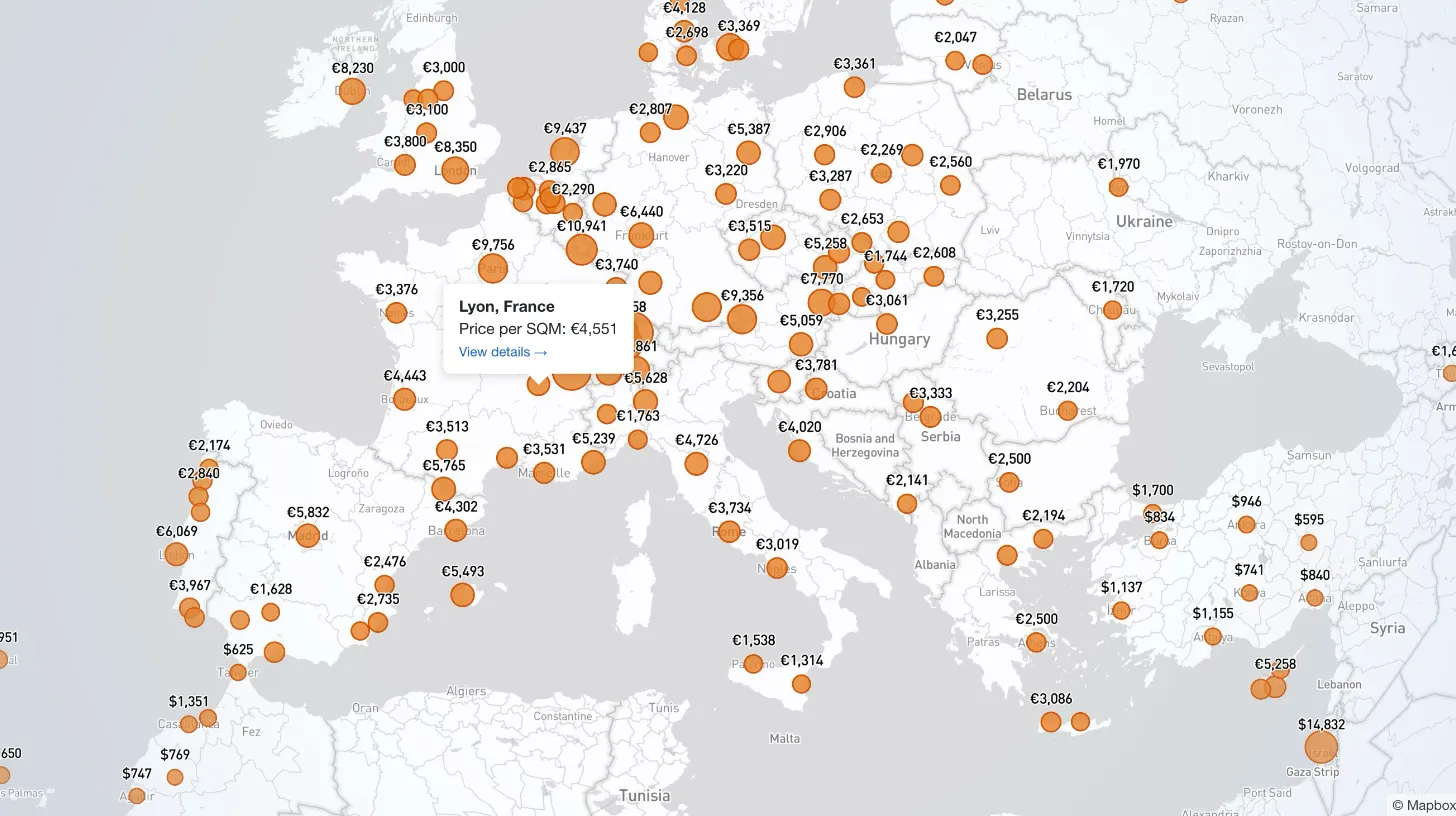
My client publishes real estate data for 80+ countries and wanted a single interactive view that could replace dozens of separate comparison tables. I built a Mapbox GL JS globe with 38+ switchable metrics, bubble and choropleth view modes, city drill-down, currency toggle, and pinned popups that deep-link into the country pages.

My law firm client's inner pages had no visible author attribution — a real problem for YMYL legal content. I added Schema.org Person microdata to the hero, intentionally bypassed the WordPress author field, and built a per-page ACF toggle for opt-out.

My client's legacy Laravel 5.1 SaaS needed modernization across payments, search, and mapping — all on a codebase that cannot be upgraded without breaking dependencies. I overhauled all three layers in two weeks, without a rewrite and without a database migration.

My client's Stripe subscription system was spread across a database table, eight-plus files, five separate client instances, and two 700-line pricing tables. I replaced it with a single config file and a service layer, deleting 4,628 lines without touching the database schema.