E-E-A-T Isn't a Plugin: Author Schema for a Law Firm WordPress Site
Rol Torralba
April 16, 2026
5 min read
My law firm client's inner pages had no visible author attribution — a real problem for YMYL legal content. I added Schema.org Person microdata to the hero, intentionally bypassed the WordPress author field, and built a per-page ACF toggle for opt-out.
My law firm client's inner pages had no author attribution. No headshot, no name, no credentials anywhere on the page. For a personal injury firm publishing content about medical malpractice, truck accident liability, and nursing home negligence, that's not a styling gap — it's an E-E-A-T gap.
Google's concept of E-E-A-T (Experience, Expertise, Authoritativeness, Trustworthiness) carries extra weight on what they call YMYL pages — "Your Money or Your Life." Legal content is YMYL by definition. The questions visitors are asking have real financial and personal stakes, and Google responds by scrutinizing who is answering, whether they're credentialed, and whether the site makes that visible. A practice area page with no authorship signal is leaving one of the most accessible trust signals on the table.
So I added an author box — placed in the hero, not below the article — with Schema.org Person microdata, an ACF per-page toggle, and one design decision that's worth explaining in full.
Most author boxes live below the article. On an editorial blog that makes sense — you finish the piece, you meet the author. But on a law firm's practice area pages, the structure is closer to a landing page than a blog post. The attorney's name and credentials belong near the top, next to the page title, where they reinforce the credibility of the content before the reader has committed to reading it.
I put the author module inside header.php's inner-page hero conditional. It appears on singular posts and pages, except the contact page. Visually it sits under the page title — "Written by Clayton T. Hasbrook / Managing Attorney / Last updated April 14, 2026" — before the body content begins.
The block is wrapped in itemscope itemtype="https://schema.org/Person", with itemprop attributes on each meaningful element:
<div class="author-box" itemscope itemtype="https://schema.org/Person">
    <picture>
        <source srcset="/img/attorney-headshot.webp" type="image/webp">
        <img src="/img/attorney-headshot.jpg"
             alt="Clayton T. Hasbrook"
             itemprop="image"
             width="48" height="48">
    </picture>
    <div class="author-box__meta">
        <span class="author-box__label">Written by</span>
        <a href="/about/#clayton-hasbrook" itemprop="url">
            <span itemprop="name">Clayton T. Hasbrook</span>
        </a>
        <div itemprop="jobTitle">Managing Attorney</div>
        <time datetime="<?php echo get_the_modified_date( 'c' ); ?>">
            Last updated <?php echo get_the_modified_date( 'F j, Y' ); ?>
        </time>
    </div>
</div>
A few things in here worth calling out:
The <picture> element. The headshot is served as WebP with a JPG fallback. Small detail, but it's the correct modern pattern — you're not paying image weight you don't need to.
itemprop="url" links to the attorney's anchor on the About page. That connection matters. The Schema.org url property on a Person entity tells Google where to find more information about this person. If the About page has its own Person markup at that anchor — with more detail about credentials, practice areas, bar membership — then the two schemas reinforce each other. Google can identify Clayton Hasbrook as a consistent entity across multiple URLs, not just a name string that shows up on some pages.
Two date formats from one call. get_the_modified_date('c') returns ISO-8601 (2026-04-14T18:32:00+00:00) for the datetime attribute — the machine-readable format Google uses for freshness signals. get_the_modified_date('F j, Y') returns the human-readable version (April 14, 2026) for what's actually displayed. Both come from the same WordPress function, just with different format strings.
On legal pages, freshness is a real ranking signal. Legal information goes stale — statute of limitations rules change, case law develops, regulations update. A visible, machine-readable last-modified date signals to Google that this page is being actively maintained.
This is the decision that tends to trip people up.
The obvious approach would be to pull get_the_author_meta() and render whatever WordPress says the post author is. Don't do that on a law firm site.
The firm's editorial policy is that all content is attributed to the managing attorney, regardless of who created the post in the CMS. A paralegal drafts a page, a marketing person updates the content, a developer adds a section — the attorney's name goes on it because the legal content is his professional responsibility. That's a deliberate stance, not an oversight.
If I'd used the native author field, attribution on every page would depend on which WordPress user happened to create it. That's wrong. It models the CMS's internal workflow, not the firm's public editorial policy.
Pro Tip: On law firm and medical sites, ask the client directly: who legally owns the content, and who do you want attributed publicly? Those are often different from "whoever created the post in the CMS." Build the attribution system to reflect the firm's policy, not WordPress's default data model. Hardcoding is often the right answer.
Not every page warrants the author box. Legal disclaimers, utility pages, the contact form — forcing the author module onto those would feel mismatched.
I added a hide_author checkbox field through ACF. The template check is straightforward:
<?php if ( is_singular() && ! is_page( 'contact' ) && ! get_field( 'hide_author' ) ) : ?>
    <!-- author box markup -->
<?php endif; ?>
The editor can suppress the author box on any page without touching code or creating a support ticket. It's a small thing, but "editors can control this themselves" is worth building in from the start.
Schema.org Person markup doesn't produce a direct ranking boost on its own. What it does is make authorship machine-readable — consistently, across every inner page on the site. Google can identify the attorney, associate him with his profile page, and build a picture of who is responsible for the content.
On a YMYL site, that pattern matters. It's not a plugin toggle, it's not a checkbox in Rank Math. It's structured data wired into the template, emitted on every relevant page, pointing at a real person with real credentials.
That's the kind of E-E-A-T signal that holds up.
Find out what's slowing your site down, where the security gaps are, and what you can improve. Takes 30 seconds to request.
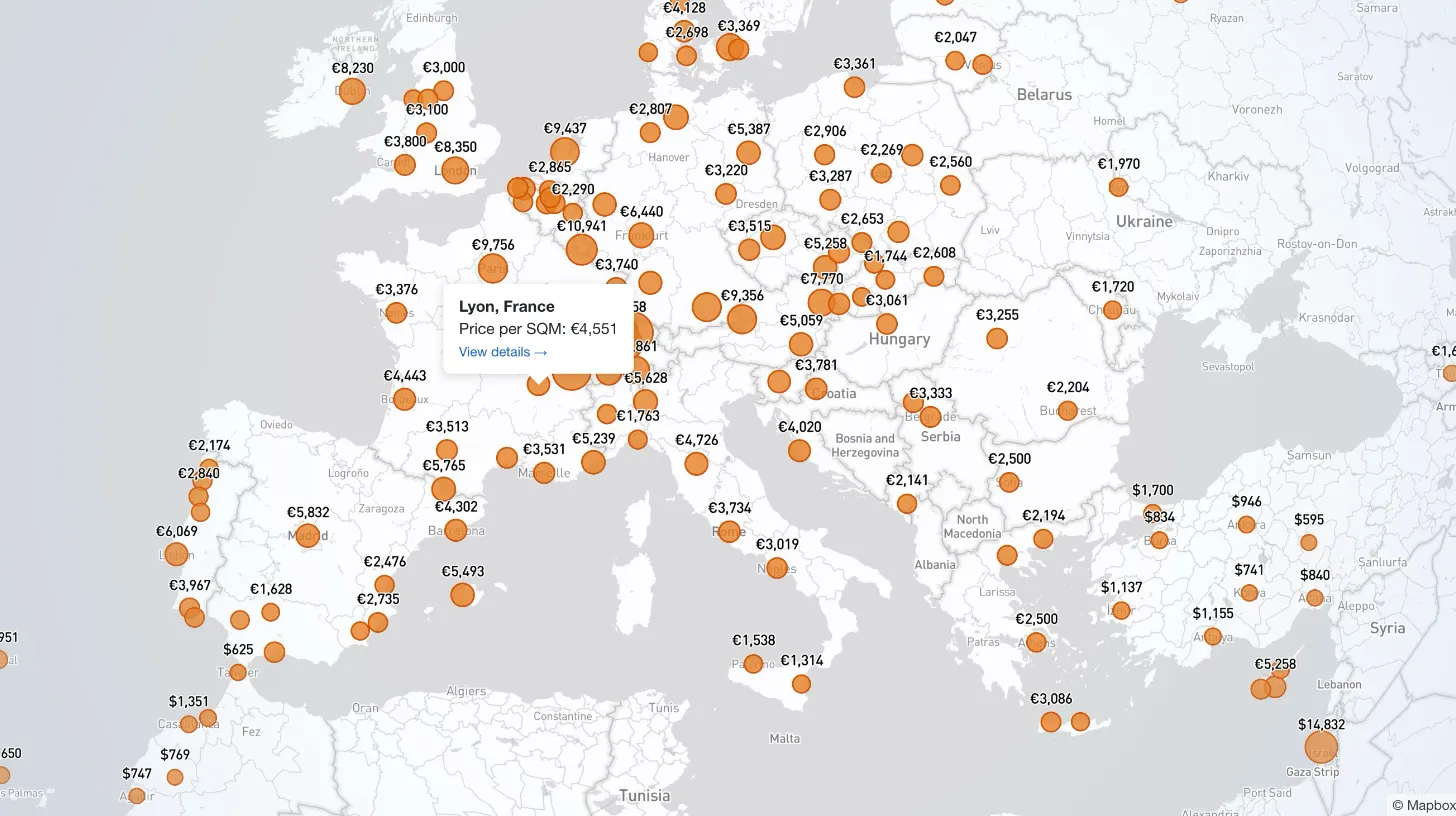
My client publishes real estate data for 80+ countries and wanted a single interactive view that could replace dozens of separate comparison tables. I built a Mapbox GL JS globe with 38+ switchable metrics, bubble and choropleth view modes, city drill-down, currency toggle, and pinned popups that deep-link into the country pages.

Every WordPress dev knows the problem: restore a prod database locally and your browser immediately redirects to the live site. I moved the URL rewrite into MySQL's init hook so it runs automatically on first boot — no manual steps, no redirect loops.

My client's legacy Laravel 5.1 SaaS needed modernization across payments, search, and mapping — all on a codebase that cannot be upgraded without breaking dependencies. I overhauled all three layers in two weeks, without a rewrite and without a database migration.

My client's Stripe subscription system was spread across a database table, eight-plus files, five separate client instances, and two 700-line pricing tables. I replaced it with a single config file and a service layer, deleting 4,628 lines without touching the database schema.