Three WordPress Upgrades for an Oklahoma Law Firm in One Sprint
Rol Torralba
April 16, 2026
5 min read
One client check-in, three real deliverables: a new Plaintiff Attorney Resource Center with vanilla JS filtering, an EEAT author box with Schema.org Person microdata, and a WP-CLI migration script that moved 80+ hardcoded case results into a proper CPT — then got deleted.
My law firm client in Oklahoma came back with a list. Three things: a new content section for plaintiff attorney resources, their author box brought back and done properly this time, and something needed to happen with their case results. That last one turned out to be a migration of 80+ manually encoded case results out of static HTML — with a WP-CLI script I'd delete the moment it finished.
Here's what actually got built.
The client wanted a dedicated section called Plaintiff Attorney Resource Center — a browsable library of attorney-authored content, separate from the main blog. Its own URL, its own content type, its own category filter.
I registered a vws_resources custom post type with a vws_resource_category hierarchical taxonomy. The archive template renders resources in a Bootstrap card grid, with each card picking up its category as CSS class names. The filter itself — clicking a category button to show only matching cards — is 14 lines of vanilla JS that toggles display: block/none and swaps button states. No React, no jQuery, no framework. One small function.
There's also a slug iteration story baked into the git history here. The resource URL went through three commits before landing. That's normal — URL decisions on a law firm site have SEO implications, and the right slug for a practice area page isn't always obvious without some back-and-forth with the client. The structural work is done; articles, parent page, and main menu placement are still on their end.
This one came with a specific requirements list, which I appreciated. Attorney headshot (served as a <picture> element with WebP and JPG fallback), name as a linked heading pointing to the full bio, "Managing Attorney" underneath, a last updated date. No firm name in the top section — it was already on the page and repeating it felt redundant. Social icons optional, but secondary if present.
On a personal injury law firm site, an author box carries real SEO weight. Law firm content is YMYL — "Your Money or Your Life" in Google's language. Legal questions affect real outcomes for real people, and Google responds by scrutinizing authorship and trust signals much more closely in this category. An author box on a practice area page isn't decoration. It's part of how the site signals that a credentialed professional stands behind the content.
The implementation is inside header.php's inner-page hero conditional — it shows on singular posts and pages, except the contact page. The whole block is wrapped in itemscope itemtype="https://schema.org/Person", with itemprop attributes on the name span, jobTitle div, image, and the URL linking to the attorney's bio anchor. The last-modified date uses get_the_modified_date('c') for ISO-8601 output (machine-readable, picked up by Google) and 'F j, Y' for what humans see.
One intentional design decision worth calling out: the author is hardcoded to the managing attorney, not pulled from WordPress's native author field. The firm attributes all site content to him regardless of who drafted it in the CMS — that's a deliberate editorial policy, not an oversight. Using the WP author field would have been the wrong abstraction here.
An ACF hide_author toggle in the page editor gives per-page opt-out without touching code.
Pro Tip: On legal and medical sites, author schema matters more than on most content categories. If the attorney's profile page has its own
Personmarkup, the author box links an inbound signal back to an established entity. Google picks up on consistent entity identification across multiple URLs — and on a YMYL site, that consistency builds ranking authority over time.
Their case results were static HTML inside page content — no structure, nothing queryable, no way for the admin to add a new settlement without finding the right file and editing raw markup. That might be fine at five results. It isn't fine at 80+, especially when the firm wins a big verdict and wants it on the site the same week.
I registered a case_result CPT (non-public — each result is a data record, not a page) with two separate taxonomies: case_category for practice area (Truck Accident, Nursing Home, Dram Shop, etc.) and case_result_tag for outcome type (Settlement, Jury Verdict, Arbitration Award, Case Study). Keeping those two concerns separate meant the archive template could group results by practice area while still showing color-coded outcome badges on each card — two-dimensional browsing without a complex query.
The SCSS badges (.cr-badge--settlement, .cr-badge--jury-verdict, etc.) are color-coded via class names, no inline styles.
For the migration itself, I wrote a WP-CLI script — temp/migrate-case-results.php — that took a static PHP array of all 80+ cases with their titles, dollar amounts, categories, tags, and content, created any missing taxonomy terms on the fly, populated the ACF price_text field, and supported --dry-run and --rollback flags. Ran it in staging, checked the output, ran it in production. Then deleted the file in the very next commit.
That's the pattern I prefer for one-off data migrations: write a proper script with safeguards, run it, remove it. Dead migration code left in a repo is just future confusion.
Three deliverables out of one client check-in. Each piece was self-contained, but they tell the same story: a law firm site where content editors were constantly blocked by static HTML, and now they aren't. Case results go in through the admin. Resources get filtered client-side without a framework. Author attribution talks to Google in structured data it can actually parse.
That's the job.
Find out what's slowing your site down, where the security gaps are, and what you can improve. Takes 30 seconds to request.
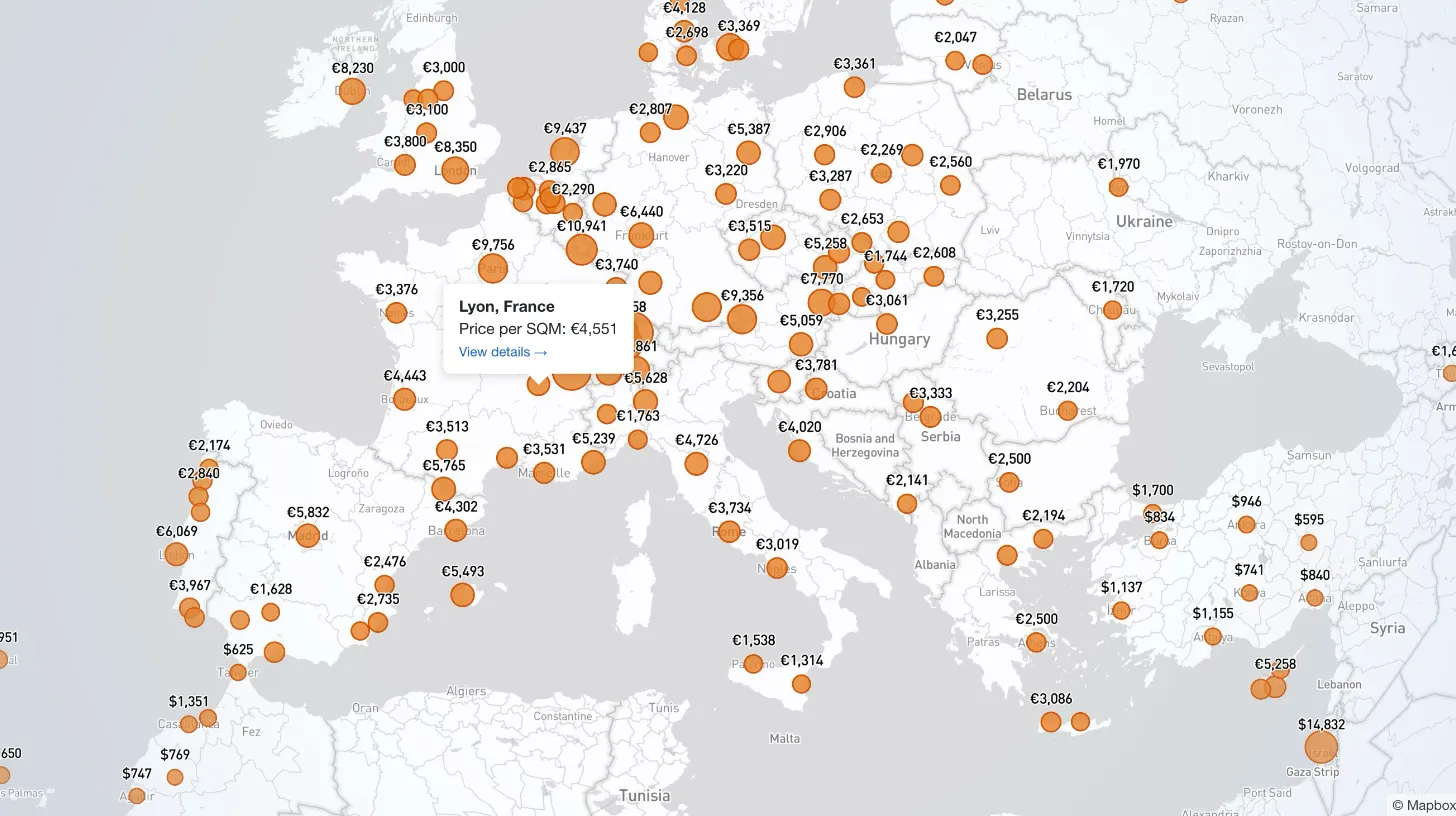
My client publishes real estate data for 80+ countries and wanted a single interactive view that could replace dozens of separate comparison tables. I built a Mapbox GL JS globe with 38+ switchable metrics, bubble and choropleth view modes, city drill-down, currency toggle, and pinned popups that deep-link into the country pages.

Every WordPress dev knows the problem: restore a prod database locally and your browser immediately redirects to the live site. I moved the URL rewrite into MySQL's init hook so it runs automatically on first boot — no manual steps, no redirect loops.

My law firm client's inner pages had no visible author attribution — a real problem for YMYL legal content. I added Schema.org Person microdata to the hero, intentionally bypassed the WordPress author field, and built a per-page ACF toggle for opt-out.

My client's legacy Laravel 5.1 SaaS needed modernization across payments, search, and mapping — all on a codebase that cannot be upgraded without breaking dependencies. I overhauled all three layers in two weeks, without a rewrite and without a database migration.