Real Estate Platform With Custom Search and Advanced Filtering
Rol Torralba
December 14, 2024
9 min read
A real estate company outgrew generic listing websites. A custom WordPress platform with advanced search, smart filtering, and streamlined admin made managing hundreds of properties practical.
When a real estate company manages hundreds of properties across multiple neighborhoods and price ranges, generic listing sites create friction. Buyers struggle to find what they're looking for. Agents waste time managing outdated listings or dealing with property data scattered across multiple systems. Fast loading becomes impossible when the database of properties is unwieldy. The website becomes a burden rather than a business tool.
I was brought in to solve exactly this problem for a growing real estate client. They had outgrown standard listing platforms. What they needed was a system built around their specific operation: how they managed properties, how buyers searched for homes, and how their team processed deals.
✅ Key Takeaway: As property inventory grows, generic platforms create exponential friction. Custom platforms designed for your business model scale efficiently and improve with size.
The assessment revealed the core frustrations. First, existing listing platforms imposed artificial constraints on how properties could be organized and searched. A buyer might want to find homes in specific neighborhoods with particular school districts and within a price range, but the platform's search interface forced them into clunky workflows that didn't match how people actually make decisions.
Second was the property data problem. Real estate companies manage complex information about each property: multiple photos, detailed descriptions, open house schedules, comparable sales, neighborhood demographics, and agent notes. Generic platforms forced this into rigid templates that didn't capture the nuance properties deserved. Property listings felt generic and interchangeable rather than distinctive.
Third was the administration nightmare. Managing hundreds of properties across multiple platforms (sometimes the company's main website, a MLS system, and various listing portals) meant property updates had to be manually replicated. If an agent updated a property description on one system, they had to manually update it everywhere else. Data inconsistencies were inevitable.
Fourth was performance. As property inventories grew, the website slowed down. Loading searches returned results sluggishly. Mobile performance suffered especially. Buyers browsing properties on smartphones experienced 3-4 second load times, which meant lost engagement and fewer property inquiries.
Fifth was the lack of differentiation. The company's listings looked and functioned identically to competitor websites. There was no opportunity to showcase their expertise or create preference for their properties through presentation. Every agent's listings had the same generic layout.
💡 Pro Tip: Optimize your database queries before you hit the wall. Proper indexing on price, location, and status fields prevents performance degradation as inventory grows. A few hours of optimization work prevents months of frustration later.
I recommended and built a completely custom WordPress platform designed specifically for real estate property management and buyer search.
Custom Property Post Type Architecture: Rather than forcing properties into standard WordPress posts, I created a custom post type with structured property data fields. Each property record included price, bedrooms, bathrooms, square footage, lot size, year built, property type (single family, condo, multi-unit), neighborhood, and dozens of additional fields. This structure allowed intelligent searching and filtering rather than text-based guessing.
I organized photos hierarchically: featured image for search results, gallery for detail pages, and virtual tour integration for advanced properties. This structured approach meant consistent presentation and easy media management.
Advanced Search and Filtering System: I built a custom search interface that let buyers refine properties using the criteria that mattered: price range (with min/max sliders), location (with neighborhood selection), property characteristics (bedrooms, bathrooms, property type), and special features (pool, garage, recently remodeled). The search used AJAX to provide instant filtering without page reloads. Buyers saw results update in real-time as they adjusted criteria.
This wasn't a generic search box. I designed this as a property discovery system that matched how people actually evaluate homes. A buyer could say "show me 3-4 bedroom homes in downtown neighborhoods under $500K with garages updated in the last 5 years" and see exactly matching results.
| Aspect | Generic Real Estate Site | Custom Platform |
|---|---|---|
| Property Data | Forced into blog template | Structured custom post type |
| Search Interface | Text box only | Multi-dimensional filtering |
| Photo Management | Inconsistent layouts | Hierarchical organization |
| Database Performance | Slows with growth | Optimized for scale |
| Admin Workflow | Multiple systems | Unified management |
| Mobile Experience | Cramped and slow | Fast and responsive |
| Agent Tracking | Manual assignment | Automated with contact info |
| Comparable Sales | Not available | Integrated analysis |
Smart Property Management: I built the admin interface specifically for real estate agents and staff. Rather than the generic WordPress post editor, property managers saw a logical form with property details organized by category. Status indicators showed whether a property was active, pending, or sold. Bulk editing allowed agents to update multiple properties quickly. I integrated agent assignments so the system could track which agent managed each property, enabling automatic contact information on listings.
Intelligent Pricing and Comparable Analysis: I built the platform to track price history for properties, showing whether a listing had been reduced or stayed stable. Properties displayed comparable recent sales in the neighborhood, giving buyers context for evaluating price reasonableness. This additional data made the listings more valuable and positioned my client as knowledgeable market experts.
Responsive Design for Mobile Buyers: Real estate search happens increasingly on mobile devices. I ensured the responsive design would make property searches, photo galleries, and agent contact information work beautifully on smartphones. Mobile visitors could easily save favorite properties (with account functionality), schedule property tours, or contact agents.
Performance Optimization for Large Databases: Searching hundreds of properties required careful database optimization. I implemented efficient query structures, proper indexing, and caching strategies to ensure search results loaded in under 500ms even during peak usage. The site could handle growth from 300 properties to 3000 properties without performance degradation.
The technology stack was purposeful: WordPress as the foundation, PHP and custom post type architecture for property data, MySQL optimization for fast queries, JavaScript for interactive filtering, and responsive HTML/CSS for mobile-first design.
The transformation was immediately visible to anyone using the platform I built. Buyers loved the search interface. Instead of browsing through irrelevant listings, they could discover exactly what they wanted quickly. Property views increased and inquiry rates improved because buyers could find relevant listings efficiently.
My client's agents experienced dramatic workflow improvements. Property updates happened once in the system, and the website updated automatically. No more manual replication across multiple platforms. Time previously spent managing property data was freed for actual client work. New agents could get properties listed in minutes rather than hours.
⚠️ Warning: Multiple data sources create inconsistency and errors. A buyer might contact an agent about a sold property, or miss an updated price. Unify your property data in one system, not many.
The searchable, filterable system I created meant high-quality leads. When a buyer contacted my client about a specific property, they'd already invested time evaluating it. Inquiries were from genuinely interested buyers, not window shoppers. This improved conversion rates from inquiry to showing to sale.
The custom design became a competitive advantage for my client. Their listings looked polished and professional compared to generic competitor sites. High-quality photography, well-organized information, and intuitive navigation conveyed that they were professional and detail-oriented. This impression influenced buyer confidence.
The advanced features I built, comparable sales analysis, price history tracking, and neighborhood demographics, positioned my client as knowledgeable experts rather than mere list-keepers. Buyers could see that they understood property valuation and market dynamics.
Mobile performance was particularly impactful. Agents could show properties on their phones using the same interface that website visitors saw. The responsive design I implemented meant consistent branding and functionality everywhere.
From an operational metric perspective, the cost of managing listings decreased significantly for my client. Fewer manual processes meant lower administrative overhead. The system's ability to scale meant growth didn't require proportional increases in staff burden.
Search rankings improved for local real estate keywords. The structured, rich property data I implemented made the site attractive to Google. Local search visibility increased, meaning more potential buyers discovered the site when searching for homes in the area.
This project taught me a fundamental truth: businesses operating at scale need systems built for that scale. Generic platforms are fine when you have dozens of properties. But when you're managing hundreds or thousands of listings, generic systems create friction that grows with your business. Every additional property makes the system slower and more painful to manage.
A custom platform built around your specific business model scales efficiently. The search interface becomes more valuable as the database grows. The administrative efficiency compounds as agents learn the system. Performance remains fast even with significant growth because the architecture was designed for it from day one.
For real estate companies, the property listing website is often the primary tool that buyers use to evaluate their services. Making that tool excellent, by building it specifically for buyer needs and property complexity, creates competitive advantage that's hard to replicate. Generic solutions can't compete with custom platforms built with your business requirements as the foundation.
Find out what's slowing your site down, where the security gaps are, and what you can improve. Takes 30 seconds to request.
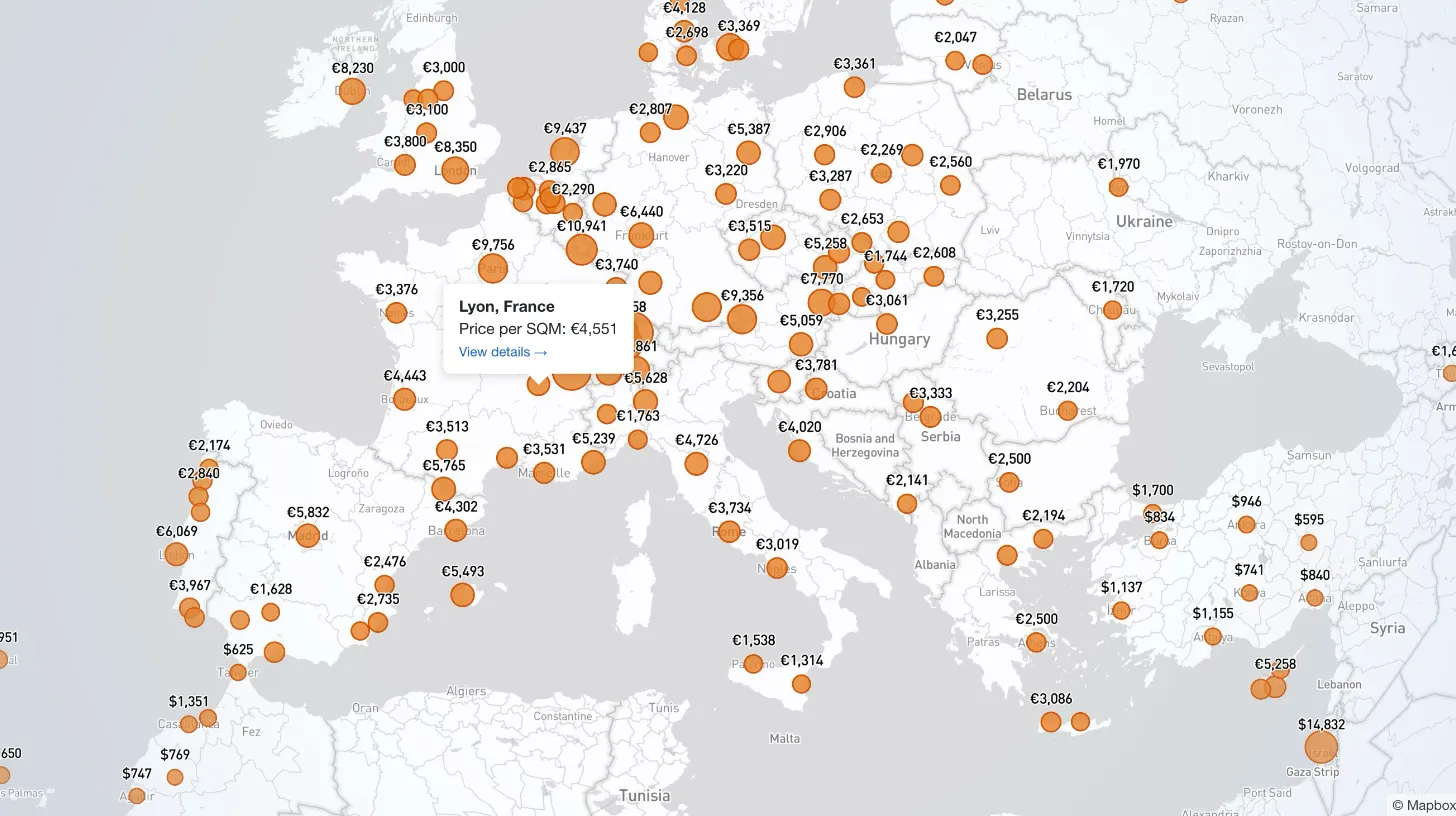
My client publishes real estate data for 80+ countries and wanted a single interactive view that could replace dozens of separate comparison tables. I built a Mapbox GL JS globe with 38+ switchable metrics, bubble and choropleth view modes, city drill-down, currency toggle, and pinned popups that deep-link into the country pages.

Every WordPress dev knows the problem: restore a prod database locally and your browser immediately redirects to the live site. I moved the URL rewrite into MySQL's init hook so it runs automatically on first boot — no manual steps, no redirect loops.

My law firm client's inner pages had no visible author attribution — a real problem for YMYL legal content. I added Schema.org Person microdata to the hero, intentionally bypassed the WordPress author field, and built a per-page ACF toggle for opt-out.

My client's legacy Laravel 5.1 SaaS needed modernization across payments, search, and mapping — all on a codebase that cannot be upgraded without breaking dependencies. I overhauled all three layers in two weeks, without a rewrite and without a database migration.