Building an LLC Guide Site With Performance in Mind
Rol Torralba
December 11, 2024
6 min read
One of my long-term clients needed a fast, accessible LLC formation guide website that would rank and convert. I built a heavily optimized custom theme that prioritized user experience and search engine visibility from day one.
My client understood something critical: when you're building a website about forming LLCs, a process filled with confusion and competing service providers, every visitor is actively searching for authoritative guidance. The first 3 seconds matter enormously. If your site loads slowly, ranks below faster competitors, or provides a mobile experience that feels clunky, you lose the opportunity to establish trust with someone making an important business decision.
They came to me knowing that they needed a website that would be a legitimate authority on LLC formation: simple to navigate, fast to load, and designed to convert visitors into leads. Speed wasn't a luxury feature they wanted me to add later. It was core SEO strategy from the start.
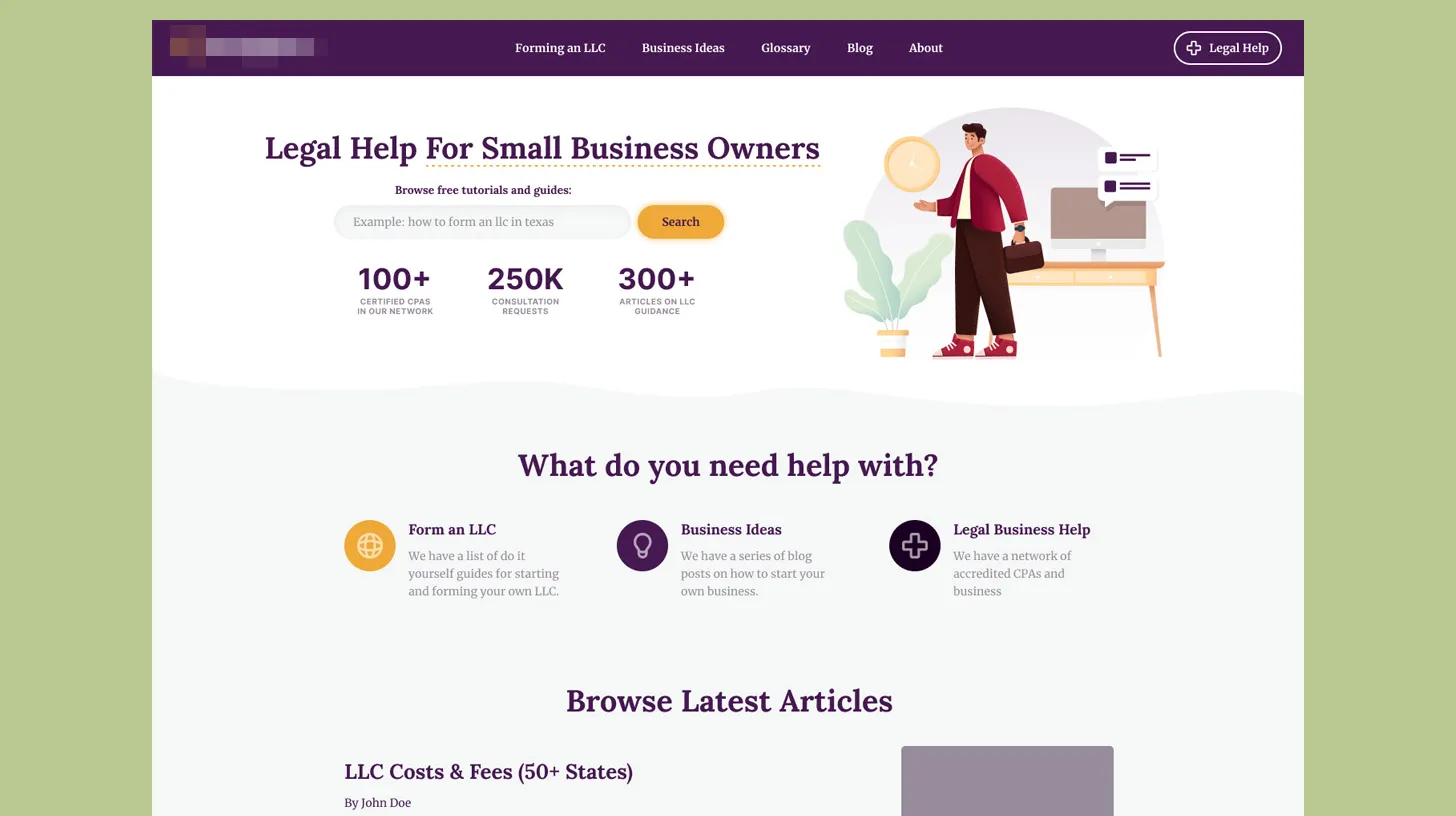
✅ Key Takeaway: For search-competitive websites, performance optimization isn't refinement, it's strategy. Fast sites earn higher rankings, better user engagement, and stronger conversion rates.
The timeline was tight. My client needed to launch quickly and capture market attention. Yet they also needed a site that would perform well in search rankings, which required proper technical SEO implementation. I faced a tension I see often in web projects: rush jobs sacrifice fundamental optimization. Fast delivery usually means using templates and plugins that introduce bloat.
Additionally, my client was building in a crowded vertical. Dozens of websites offered LLC formation guidance. To win organic search visibility, I knew the site needed to be legitimately faster than competitors, more authoritative, and better structured for search engines. Performance couldn't be an afterthought.
The risk was clear: if I rushed this using generic themes and plugins, the result would be technically acceptable but not competitive. It would load slowly, rank poorly, and underperform its potential.
I committed to a disciplined optimization-first approach. I built the site on a custom WordPress theme designed specifically for minimal bloat, fast rendering, and proper technical SEO implementation.
Deliberate Minimalism: I designed the custom theme to exclude unnecessary features. No fancy JavaScript libraries that provide visual polish but slow page loads. No complicated plugin dependencies. The theme includes only what the site actually needed: clean content display, basic contact functionality, and proper semantic HTML structure. This minimalism meant a lightweight codebase that renders quickly.
In-House Functionality: Rather than adding external plugins for features, I built critical functionality directly into the theme using PHP. This included the contact form (built with clean, efficient code rather than a bloated form plugin) and SEO functionality implemented directly rather than relying on plugin overhead. I limited external plugins to essentials only, reducing dependency conflicts and performance drag.
Structured Data Markup: I implemented proper schema.org structured data markup throughout the site. Organization schema on the homepage, BreadcrumbList for navigation, and custom schemas for instructional content. This wasn't about earning rich snippets (though those help). It was about making the content machine-readable, which search engines prefer. I built the structured data into the theme markup, not as a plugin layer.
💡 Pro Tip: I always use schema.org structured data markup for guidance content and business information. When Google understands content structure and context (who created it, what topics it covers, whether it answers specific questions), it can rank you higher for those queries. This is particularly valuable in competitive niches like legal guidance or business formation.
Mobile-First Implementation: I built the design for mobile-first experiences, with responsive breakpoints that ensure excellent performance on smartphones, tablets, and desktops. I prioritized mobile loading performance because mobile-first indexing is how Google evaluates most sites.
Image Optimization Strategy: I optimized every image on the site for size and format. The site uses modern image formats (WebP with fallbacks), lazy loading for below-the-fold images, and appropriately sized images at each responsive breakpoint. A typical website might load 2MB of images; I delivered the same visual quality at roughly 400KB.
Caching and Delivery: I configured WordPress caching properly: page caching, object caching, and browser cache headers all optimized. Content delivery is straightforward and fast, without relying on expensive CDN services that would be overkill for a mid-sized site.
I prioritized search engines and users equally in the technical implementation. The site's HTML is semantic and clean, making it easy for crawlers to understand content hierarchy. Page structure follows best practices: H2 and H3 tags for proper heading hierarchy, semantic section elements, and logical content flow that serve both human readers and search algorithms.
From an operational perspective, my client owns the system completely. No plugin vendor lock-in. No dependency on third-party tools that might disappear or change pricing. If the site needs to evolve, the codebase is clean and maintainable. Anyone with WordPress knowledge can understand the implementation.
The performance advantage has compounded over time. As the site accumulates more content and authority, the foundation of speed and technical SEO means growth scales smoothly. There are no speed penalties or ranking drops from poor site architecture because I built the architecture correctly from day one.
This project taught me a critical principle I now apply to all content-driven business websites: start with performance and technical correctness as non-negotiable priorities. Don't treat them as refinements to add later. Don't choose convenient plugins over clean architecture. Don't accept slow load times as inevitable.
For websites competing in search results, where my client lives or dies based on Google visibility, every performance optimization is also an SEO optimization. Speed is authority. Loading quickly builds user trust. Proper structure helps search engines understand content. These aren't separate concerns; they're interconnected.
The LLC guide site succeeded because I built it with these principles as the foundation, not as afterthoughts. The result is a website that performs well in real-world use and earns visibility in competitive search results.
Find out what's slowing your site down, where the security gaps are, and what you can improve. Takes 30 seconds to request.
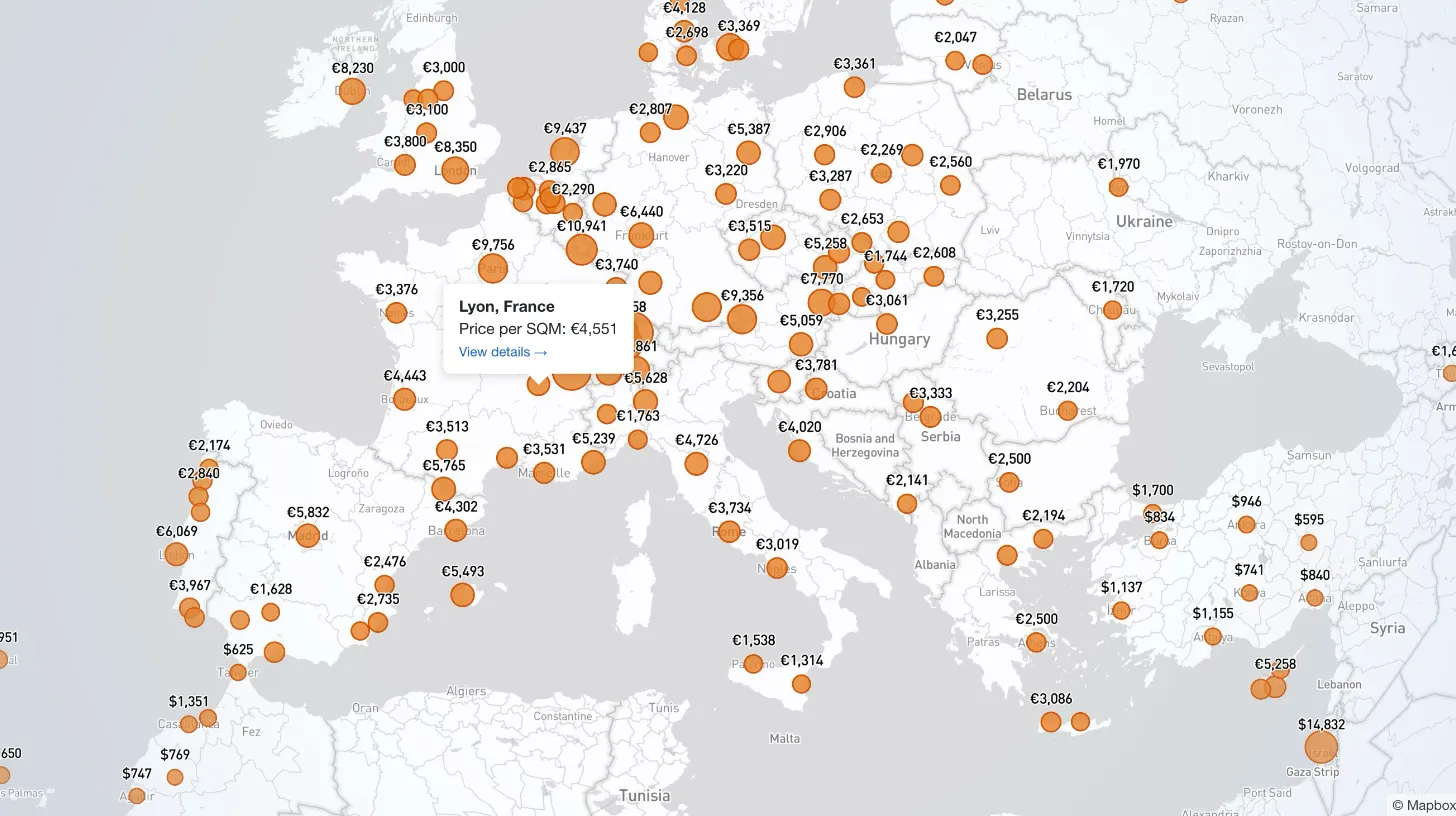
My client publishes real estate data for 80+ countries and wanted a single interactive view that could replace dozens of separate comparison tables. I built a Mapbox GL JS globe with 38+ switchable metrics, bubble and choropleth view modes, city drill-down, currency toggle, and pinned popups that deep-link into the country pages.

Every WordPress dev knows the problem: restore a prod database locally and your browser immediately redirects to the live site. I moved the URL rewrite into MySQL's init hook so it runs automatically on first boot — no manual steps, no redirect loops.

My law firm client's inner pages had no visible author attribution — a real problem for YMYL legal content. I added Schema.org Person microdata to the hero, intentionally bypassed the WordPress author field, and built a per-page ACF toggle for opt-out.

My client's legacy Laravel 5.1 SaaS needed modernization across payments, search, and mapping — all on a codebase that cannot be upgraded without breaking dependencies. I overhauled all three layers in two weeks, without a rewrite and without a database migration.